
Pitch
Thing & Fist is a two player action game where players play as two magical criminals, bashing their way through swarms of enemies to complete their goals.
The intent of this game was to create a game where both players had different abilities and had to work together to take down their foes.
Overview
In Thing & Fist, the two players each control one of the titular duo. Thing is nimble, being the smallest and fastest of the two. He can shoot projectiles to deal damage, dash quickly in a direction, and support Fist with a shield or by luring enemies to a spot with a trap. Fist is durable, being able to take and deal more damage. Fist can take swings with his giant fists to deal damage, charge forward to clear enemies, and also support Thing by creating walls and stunning large groups of enemies. By working together, the players can take on large groups of swarming enemies, with some having special qualities that make them more difficult to take on. The goal is to get to the end of each level, collecting as much money as possible to increase the score at the end. Players can revive each other, but only a set number of times and if both die or are out of revives, their run ends.
Platform
Steam
Date
Spring 2024
Genre
Action/Beat em’ up
Role
Systems/UI Designer
ROLE 1
UI/UX Designer
In the beginning, I helped to create a vision for how our game should feel to play by testing old builds and going over feedback. My role was to do research and come up with a plan on how to add to these new abilities and existing abilities to make every action satisfying and readable by the players. I was also in charge of working with the artists to get new UI assets done and place them in a way that was concise and understandable. The research I had done, as well as my collaborations with the art team, led to me working on prototyping the effects and UI needed for our vision. Once the art was done for them, I also led the process of implementing the final versions and coding them to work properly with the game systems and events. At the bottom of this page are videos showing off early testing of these effects.
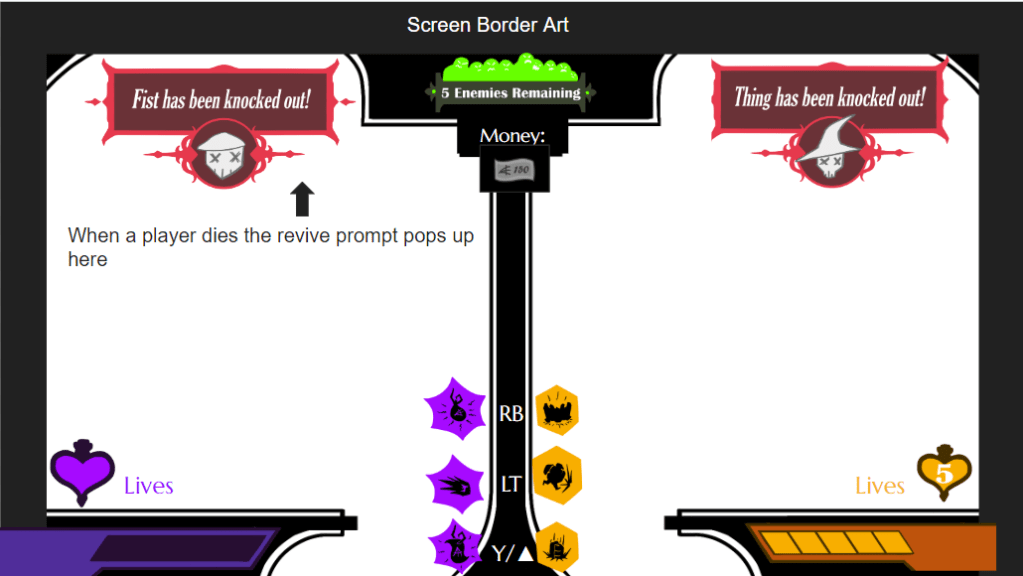
Wireframe that shows how the final UI changes based on the current game state.
ROLE 2
QA Manager
Another area I focused on was with being one of the main people to carry out weekly testing of our new systems. Every week I was assigned to test, I would sign up for a slot in the weekly testing sessions that Champlain holds and go there to oversee the session. Assisting testers and taking in real-time feedback, I could get a great idea of what made our game fun to play each week and what needed to be fixed or improved for our next sprint. I was also in charge of creating the summary documents of the testing from the surveys we had testers fill out. This summary contained all info gathered from the surveys on what players though about different parts of the game we were testing each week and gave me

Picture of a section from the testing survey given to testers to give their feedback.
Team Whimsy
This game was part of the Capstone Project at Champlain College and as part of greenlight, certain teams went on and the others were absorbed into the projects that were to be carried forward. I joined this team in the second semester and was able to find my place, helping out with designing systems and being the one creating most of the game feel effects. I worked a lot with all disciplines to make sure the effects were working correctly and thus, I bonded well with a lot of people to form a cohesive structure for implementing the final designs.
Grahm Okai – Game Producer
Sam Dansereau – Game Programmer
David Silverman – Systems Programmer
Andrew Feddersen – Systems Programmer
Noah Thompson – AI/Gameplay Programmer
Ethan Levine – Level Designer
Dillon Landry – Systems Designer and Composer
Max Cohen – Systems Designer
William Chrin – Systems/UI Designer
Phil Kachura – UI/UX Designer
Kyle Oeze – Level Designer
Wisdom Edwards – Lead Artist
Eva Colabatistto – Environment Artist
Avery Whitehead – UI/Character Artist
Kay Williams – Animator
Riley Burns – Sound Designer
Research & Implementation
My research for Thing & Fist centered around the player experience and how to use visuals to communicate game mechanics. The first part was creating a list of important player and enemy actions. Some of these already had effects, but new mechanics were to be added and all effects would be getting overhauled over time. My research into our game noted that players hitting enemies and taking damage needed to be conveyed more in visuals. The only thing that was there was a grunt sound each character had when hit. So I looked at online sources to see what is most effective for visuals in action games. I also took a look at old beat-em-up games like Streets of Rage and Final Fight to see how feedback on hits dealt and taken was done. I then laid out plans in my research to add particle effects to players hitting and getting hit by enemies to make it clearer when characters were taking damage. Screen shake was also added to big attacks, like Fist’s ground pound and Thing’s ability to detonate the lure he can drop to draw in enemies. Both Thing and Fist also flashed in color when hit and when the had invincibility after hit for a period of time to denote how long the player was safe for. These mechanics were tested over a few sprints and all were met with positive reception as they were being developed and once finalized.
Documentation
Game Feel Documentation
This document is an overview of the goal for game feel within Thing & Fist for enemies. It contains our goals and plans for implementing effects onto enemies for game feel, as well as status updates.
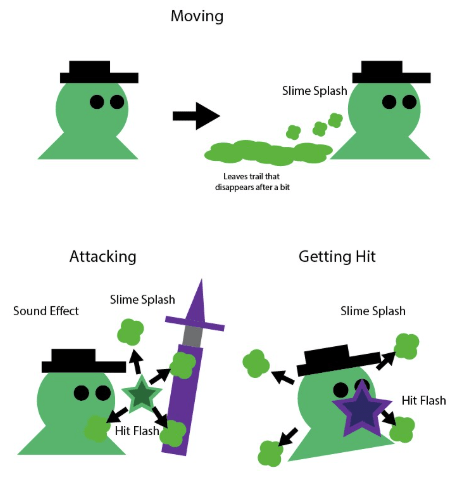
This image is one of the visual displays I created for realizing the effects needed for our basic enemy. It has descriptors for each part and arrows to convey how the particles would move. For example, our basic slime enemy would leave a trail while moving for immersion, create a slime splash effect when attacking to signal the player was hit, and a similar effect with different flair for Thing or Fist would play when the enemy is hit by either of them. This was give to the artists and other designers to aid in creating the effect that I would then tweak and apply where needed on the enemy Events.
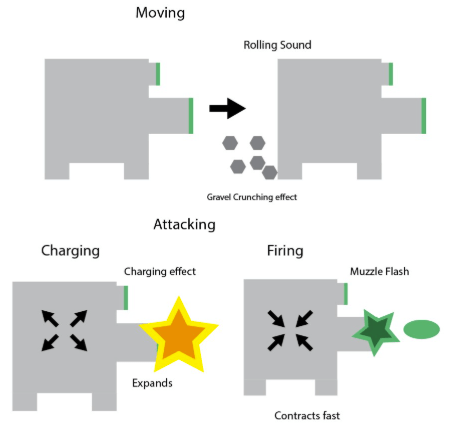
This display is one for a ranged enemy in the game. It shows a different style to the movement of it to convey what this enemy is in the world of our game, being a mechanical sentry. It also shows the plan to make it change size by expanding and contracting when firing. This will aid players into knowing when it will shoot, as well as leaning into the old cartoon influence of our game. Both of these graphs show the process of designing and implementing these effects and you can see how they developed into the final game.
Testing Summary Example
This document is one of many summaries written on our testing sessions.
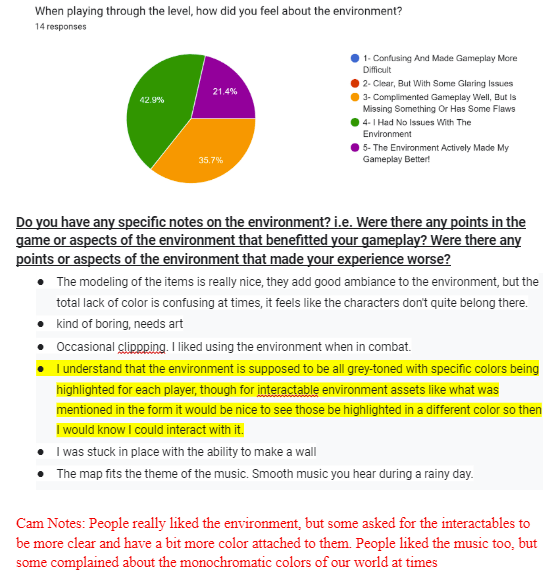
Our survey was split into multiple sections with questions looking for answers on a scale from 1 to 5 (bad to great). I created charts from the multiple choice answers given to show how the majority felt about each section of the game. Space was given as well for the testers to leave written feedback on each section and all of them were noted below the chart. The red text and highlights were added by me to note important feedback given and to summarize the thoughts of each section.

At the end of the document, I give a full summary of the major points of both praise and criticism that were noted by testers. I also give potential goals for the current sprint. and the next one that we discuss during our big weekly meeting as a full group. There is a lot of info in each document, but having the highlighted noted and written summaries helped to condense it into a great source of info for where we were to go each week.
 William Chrin